

Microsoft 365 Copilot Architecture
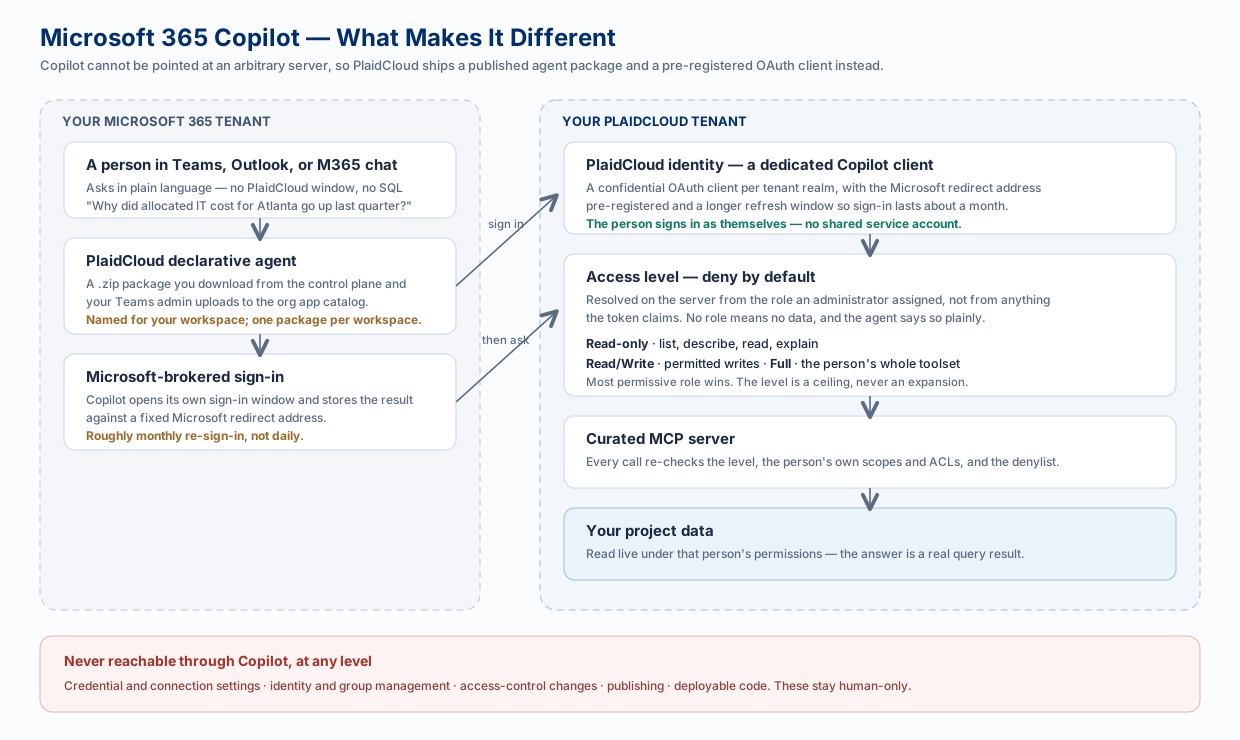
Microsoft 365 Copilot is the one integration that cannot follow the normal pattern. A coding agent can be handed a server address and told to authenticate; Copilot cannot. It only talks to agents that have been published into your Microsoft 365 tenant, and it hands sign-in back to Microsoft against a fixed redirect address.
That constraint shapes everything on this page. For the click-by-click install, see Microsoft 365 Copilot — this page explains what those steps are actually doing.
Why It Is a Special Case
Section titled “Why It Is a Special Case”| Constraint Microsoft imposes | What PlaidCloud does about it |
|---|---|
| Copilot only runs agents published in your M365 app catalog | Ships a declarative agent package (a .zip) you download from the control plane and your Teams admin uploads |
| Sign-in must return to a fixed Microsoft redirect address | Provisions a dedicated confidential OAuth client per tenant with that address pre-registered |
| Custom apps are blocked by default | Requires the Upload custom apps setup policy to be turned on — a separate switch from being a global admin |
| Copilot re-authenticates on its own schedule | Extends the refresh window so sign-in lasts roughly a month rather than a couple of days |
The package is per workspace, named after that workspace. Installing it is not the same as granting access, which is the next section and the one people trip over.
Deny by Default
Section titled “Deny by Default”A person who has installed the agent and signed in successfully still gets no data until an administrator assigns them an access level. The agent connects, authenticates, and answers “no access has been granted” — that is the system working, not an error.
The level is resolved server-side from the assignment an administrator made, not from anything the incoming token claims. A token cannot talk its way into a higher level.
| Level | The agent can… | Typical use |
|---|---|---|
| Read-only | List and describe projects and tables, read table data, list dimension members, explain allocations | Most people — the safe default |
| Read/Write | The above, plus writes that person is already permitted to make | Analysts who maintain data |
| Full | That person’s complete tool set, including raw SQL that writes | Power users and builders |
Two rules on top:
- Most permissive wins. If someone somehow holds more than one level, the highest applies.
- The level is a ceiling, never a grant. Within it, the person’s own PlaidCloud roles and ACLs still apply, so the agent can never surface data they could not already open themselves.
Always Off-Limits
Section titled “Always Off-Limits”Regardless of level, and regardless of the person’s own permissions, Copilot can never reach:
- connection and credential settings, or document-account credentials and access control
- member management, group and role assignment, distribution lists, password reset
- project access control and publishing
- user-defined function code and app deployments
These are irreversible or credential-bearing actions where a prompt-injection misfire would be costly and which are rarely part of analytical work. They stay human-only.
The Path of One Question
Section titled “The Path of One Question”-
A person asks the agent in Teams, Outlook, or Microsoft 365 chat.
-
Copilot calls the agent, which needs a PlaidCloud identity — on first use it prompts for sign-in through Microsoft’s own window, and stores the result.
-
The request reaches the PlaidCloud MCP endpoint carrying that person’s token.
-
The server resolves their access level from what an administrator assigned. No level, no data.
-
Every tool call is checked against the level, their own scopes and ACLs, and the denylist.
-
The answer comes back from a real query — with a confidence signal and caveats, not a guess.
Because the level is checked live on every request, granting access takes effect on the person’s very next message. There is nothing to sign out of or reinstall.
Copilot Versus Coding Agents
Section titled “Copilot Versus Coding Agents”Both connect to the same MCP server and obey the same enforcement, but they are aimed at different people:
| Microsoft 365 Copilot | AI coding agents | |
|---|---|---|
| Who | Whole teams, non-technical | Analysts and developers |
| Where | Teams, Outlook, M365 chat | An IDE or desktop client |
| Setup | Admin publishes a package once | Each person connects their own client |
| Access model | An assigned level, deny by default | The person’s own permissions |
Related
Section titled “Related”- Microsoft 365 Copilot — the setup guide
- Analysis Paths — so everyone asks about the same table the same way
- Answers You Can Trust — confidence and caveats
- AI and LLM Architecture — the shared governed path