
Retrieval, Grounding, and Analysis Paths
“RAG” usually means one thing: chop the corpus into fragments, embed them into a vector store, and paste the nearest matches into the prompt. PlaidCloud does that for exactly one corpus — the product documentation — and deliberately does not do it to your data.
Your tables are read live, at the moment they are asked about, under your permissions. That is not a performance decision; it is what makes an answer trustworthy and an access control meaningful.
Lane 1 — Choosing Which Tools to Offer
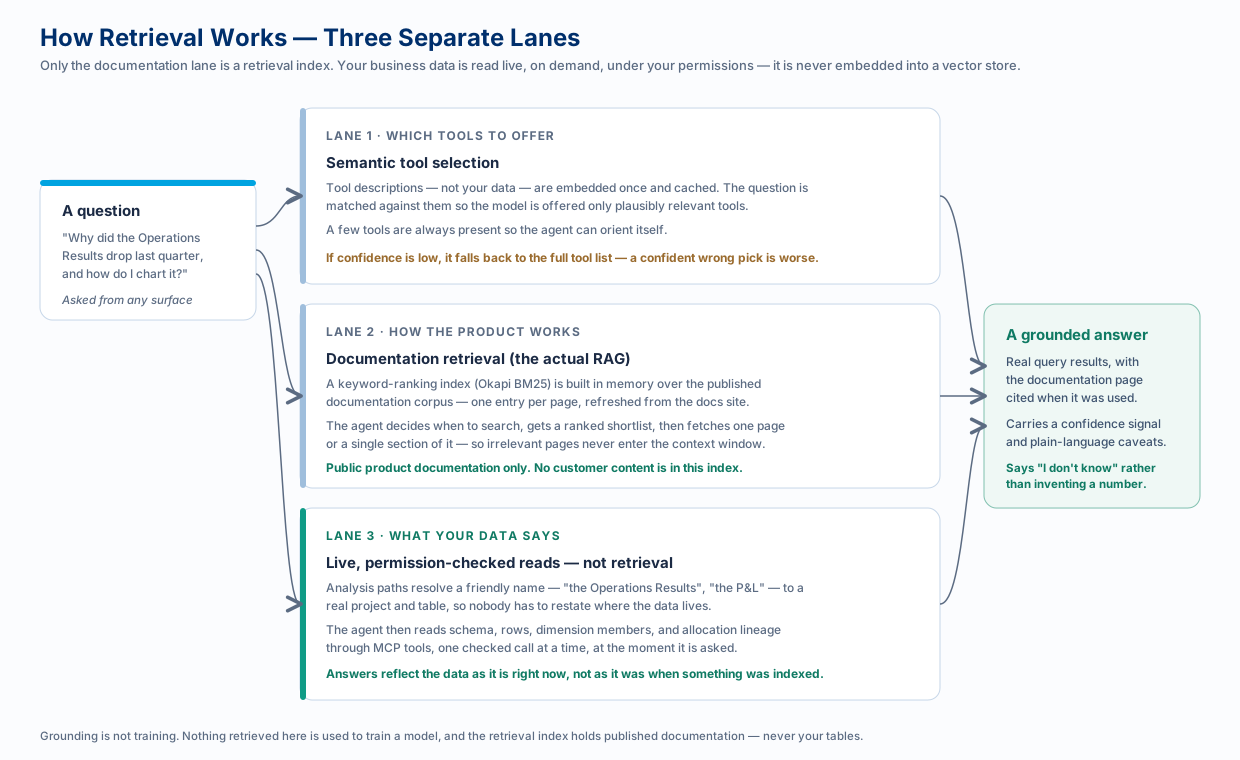
Section titled “Lane 1 — Choosing Which Tools to Offer”This lane runs for the in-app assistant, which carries its own tool catalog. Every tool description it shows the model costs prompt tokens on every turn, so before the model sees anything, the question is matched by semantic similarity against the tool descriptions — never against your data — and only plausibly relevant tools are offered.
On the other surfaces the tool catalog is handled by the MCP connection instead: Anthropic’s connector manages it server-side, and the client-side loop caps the surface it declares. Lanes 2 and 3 below apply everywhere.
Three details matter:
- The embeddings describe tools, not content. They are computed once from tool names and descriptions and cached, and rebuilt automatically when a description changes.
- A few tools are always present so the agent can orient itself — work out who is asking and in which project — even when the question mentions neither.
- Low confidence falls back to the full list. A confidently wrong narrowing is worse than paying the full token cost once, so an uncertain match simply shows everything. Very short turns (“thanks”, “ok”) skip the step entirely.
Lane 2 — Grounding in the Documentation
Section titled “Lane 2 — Grounding in the Documentation”This is the genuine retrieval-augmented generation path, and it answers “how do I…”, “what is…”, and “where do I configure…”.
The published documentation is fetched as a structured corpus — one entry per page — and indexed in memory with Okapi BM25, a keyword ranking function. The agent then works in two moves:
- Search returns a ranked shortlist of pages: slug, title, description, score.
- Fetch pulls one page, or a single named section of it, once the agent has decided which one it actually needs.
The design point is that the agent decides when to search and how much to read. Passive injection pastes something into every prompt whether it helps or not; tool-driven retrieval keeps irrelevant pages out of the context window entirely, and lets the agent cite the page it used so you can follow up.
If the documentation corpus is briefly unreachable, the agent answers without it rather than failing the turn.
Lane 3 — Reading Your Own Data
Section titled “Lane 3 — Reading Your Own Data”Questions about your numbers are not answered by retrieval at all. The agent reads what it needs, when it needs it, through permission-checked tools: table schemas, rows, dimension members, workflow lineage, allocation traces.
This is why answers are current — they reflect the data as it is now, not as it was when something was last indexed — and it is why access control works: there is no pre-built index that could leak across a permission boundary, because there is no index.
Analysis Paths — The Naming Layer
Section titled “Analysis Paths — The Naming Layer”Live reads need to know which table. Analysis paths are the shared vocabulary that makes that painless: a friendly name — “Operations Results”, “the P&L”, “Headcount” — mapped once to a real project and table, and usable by everyone in the workspace from then on.
- Ask by name instead of naming a project and a table every time.
- Mark one as the workspace default so an untargeted “what changed last quarter?” lands somewhere sensible.
- Everyone means the same thing. When the whole team says “the P&L”, they reach the same table.
An administrator registers them; anyone can use them; every question still runs under the asking person’s own permissions. They work identically from the in-app assistant, Microsoft 365 Copilot, and a connected coding agent. See Analysis Paths for how to set them up.
The Expression Catalog
Section titled “The Expression Catalog”When the assistant writes an expression, it does not guess function names from memory. It consults a structured catalog of every PlaidCloud expression function — name, signature, documentation link, category — cross-checked against the functions your warehouse actually provides, with close-match suggestions when a name is nearly right. A lookup, not a similarity search, because for function names “nearly right” is wrong.
Grounding Is Not Training
Section titled “Grounding Is Not Training”Two things people reasonably worry about:
- Nothing retrieved here trains a model. Grounding puts information into one request. It does not change model weights, and your content is not used to train anyone’s model.
- The retrieval index holds public documentation only. No customer content is embedded into it.
Where your data does go — and how to keep it inside infrastructure you control — is covered in Using Your Own Controlled LLM.
Why This Produces Better Answers
Section titled “Why This Produces Better Answers”Grounding is what lets the assistant say “I don’t know” instead of inventing something. Because every figure comes from a real query and every product claim from a real documentation page, an answer can be graded: each one carries a confidence signal and plain-language caveats, and a narrative summary is checked so it cannot quietly drop a limitation or cite a number the analysis never produced. See Answers You Can Trust.
Related
Section titled “Related”- Analysis Paths — set up the shared names
- Tracing Allocations — asking why a result moved
- AI and LLM Architecture — the surfaces and the shared path